
Published on
AI Update: Task Automation and Minimum Standards
Meet Victorian Minimum Standards with ease using our new AI-powered report processing and automated task suggestions.
We’re excited to bring you a suite of new AI-powered features designed to take the manual work out of your compliance workflow.
These updates focus on the 15 Minimum Standards regulations in Victoria and leverage deeply integrated AI to turn your compliance reports into actionable tasks instantly.
As always, these features were built based on your suggestions to help you manage your portfolio in one hub, regardless of which third-party suppliers you use.
What’s New?
- Rental Minimum Standards Card
- AI Report Processing & Task Suggestions
- Visual “Further Works” Indicators
- AI Property Summaries
- New Support & Feedback Menu
1. Rental Minimum Standards Card
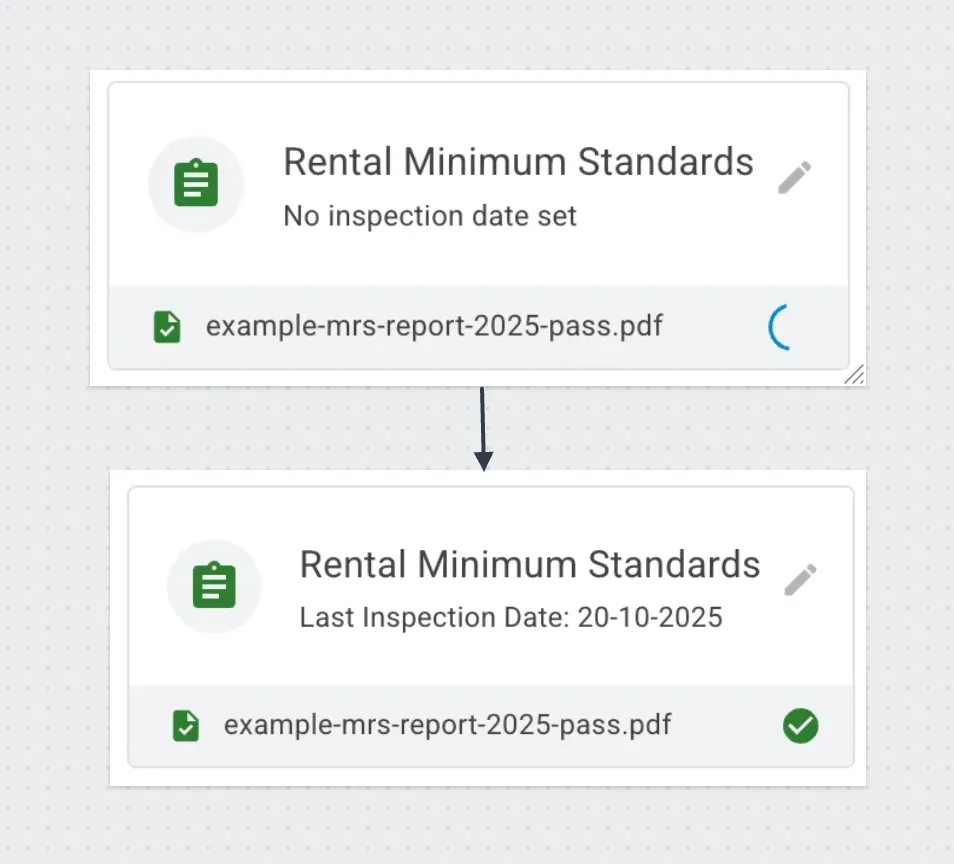
In Victoria, properties must meet all 15 minimum standards before they can even be advertised for rent. To help you stay on top of this, we’ve added a dedicated Rental Minimum Standards card to the property detail page.
- Centralised Storage: Store Minimum Standards reports created by any third-party supplier directly in Properteasy.
- Auto-upload to PropertyMe: Any Minimum Standards report you upload to Properteasy is automatically sent to PropertyMe, so owners can see them in their portal instantly.
- Audit Ready: Keep your compliance history organised and easy to find in one secure place.
2. AI Report Processing & Task Suggestions
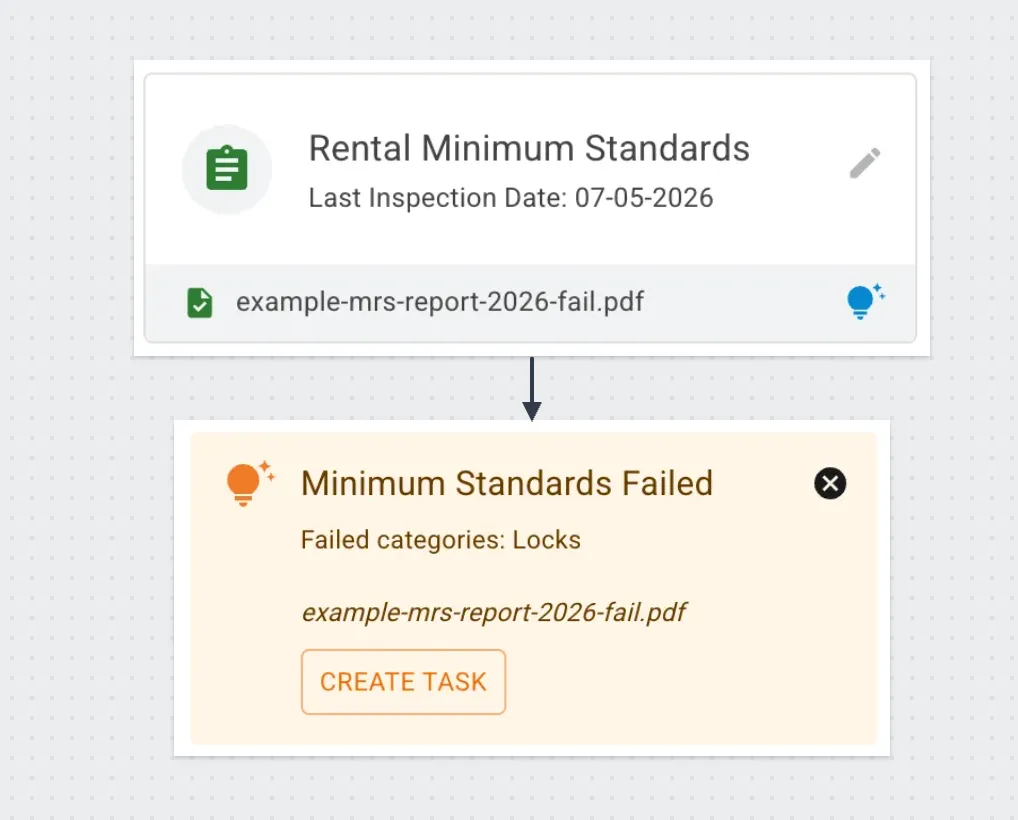
We’ve integrated AI more deeply into the platform to handle the data entry for you. This now works for all compliance reports (Gas, Electrical, Smoke Alarms, etc.).
- Auto-Save for Minimum Standards: When you upload a Minimum Standards report, the AI extracts and automatically saves the inspection date for you.
- Smart Task Creation: The AI identifies “failed” items within the report and suggests creating a task.
- One-Click Detail: Clicking Create Task on a suggestion automatically generates a new task with all the failed item details pre-filled in the description.
We want your feedback: We’re constantly refining how the AI writes these descriptions.
We’d love to hear from you on how we can make these task descriptions as useful as possible for your team.
3. Visual “Further Works” Indicators
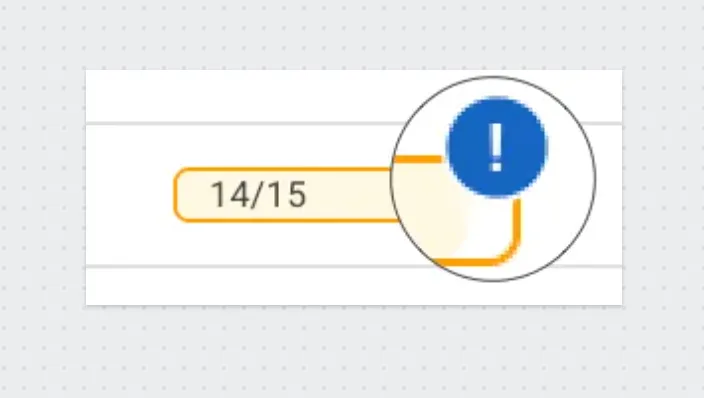
We’ve updated the properties list to give you a clearer view of what can be advertised and what still needs attention.
- Progress Bar Icon: You’ll now see a “Further Works” icon on the Minimum Standards progress bar whenever there is an open task or a pending check!
- Instant Clarity: This gives you a clear indication of whether a property is legally ready to hit the market or if rectification work is still in progress.
4. AI Property Summaries
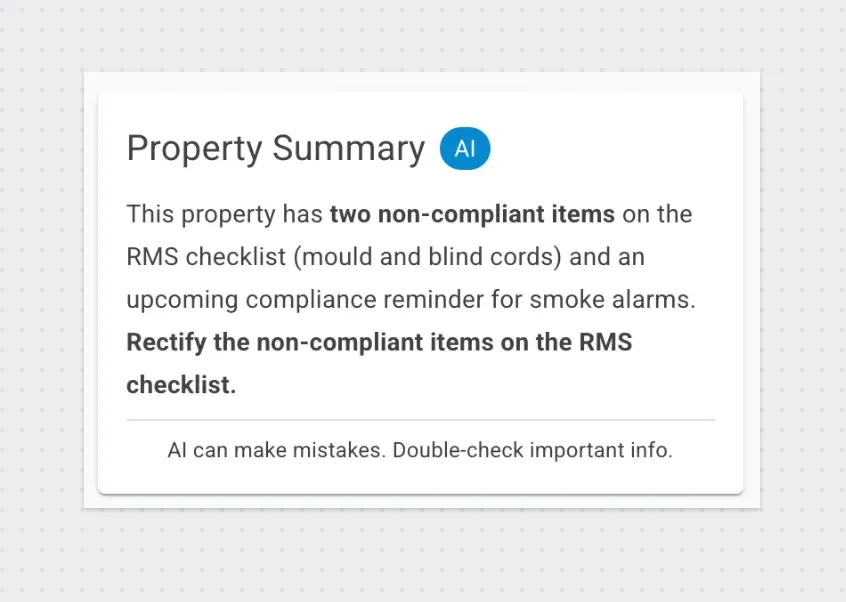
Need a quick brief before a meeting or owner update? You can now generate a high-level AI summary for any property.
- Status Overview: Summarises current compliance status, including Minimum Standards.
- Actionable Next Steps: The AI suggests exactly what needs to happen next for that property.
5. New Support & Feedback Menu
Your feedback drives our development. We’ve added a Support menu item to the interface so you can easily:
- Submit Feedback: Tell us what you think of the new AI task suggestions.
- Suggest Features: Help us decide what we should build next to make your job easier.
What’s Next?
We have big plans for 2026. We are currently making great progress on the supplier side of Properteasy, which will further simplify property managers workflow and connect the dots even faster.
If you have any questions about our roadmap or have a specific feature you’d love to see built, please reach out to our team. We’re always listening.
Want to see these AI features in action?
Book a demo today and see how we can simplify your portfolio management.

Petr Tichy
Subscribe to our newsletter
Stay updated on new releases and features, guides, and case studies.